BrainRoad AI Company: Your Personal AI Workforce With a Chain of Command
On this page
You have an AI assistant. It can answer questions, write drafts, summarize documents. It is, fundamentally, a single employee sitting at a desk waiting for you to tell it what to do next.
That model breaks the moment you need two things done at once. Or five. Or twenty.
You cannot scale a chatbot. You can scale a company.
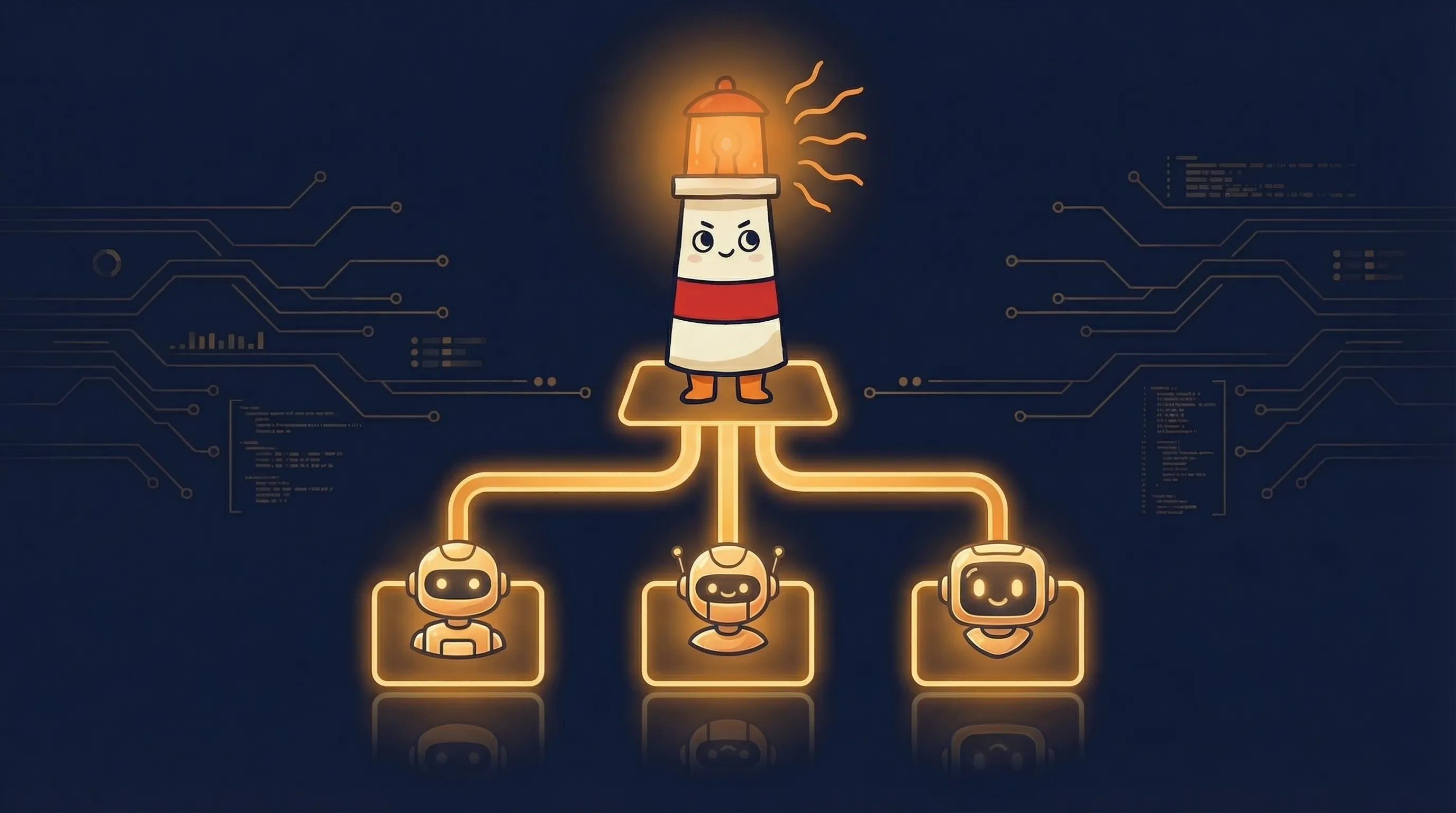
That is the idea behind BrainRoad’s AI Company feature — a built-in capability of every BrainRoad account that turns your hosted AI agent into the CEO of a structured workforce. Not a metaphor. An actual org chart with specialist agents, a task tracking system, approval workflows, budget caps, and a full audit trail of every decision made and action taken.
If you have been exploring agentic AI — AI systems that plan, decide, and act with genuine autonomy — AI Company is what it looks like when that concept meets real governance. Not a demo. Not a research paper. A working system you can use today.
The Problem With Single-Agent Platforms
Most AI agent platforms give you one agent. A powerful one, sure. But one. You talk to it, it responds, you talk again. The interaction model has not fundamentally changed since the first chatbot shipped.
This creates three problems that become obvious the moment you try to use AI for real work:
Bottleneck on you. Every task requires your input to start and your attention to finish. The agent is not working while you are sleeping, eating, or focusing on something else. It waits.
No specialization. A single agent handles everything — coding, writing, research, analysis — which means it handles nothing with deep expertise. Jack of all trades, master of none. You would never run a company with one employee doing every job.
No accountability. When a single agent produces bad output, you have no way to trace what went wrong. No audit trail, no chain of decisions, no record of which step failed. You just see the final result and have to debug it yourself.
The AI Company feature solves all three by replacing the single-agent model with something that actually resembles how work gets done: delegation, specialization, and oversight.
How AI Company Works
When you open the AI Company section in your BrainRoad dashboard, here is what you get.
Your CEO Agent
Every BrainRoad user’s hosted OpenClaw agent becomes the CEO of their AI company. This is not a new agent — it is your existing agent with a new role. The CEO’s job is to take your high-level goals and break them into actionable work.
When you first set up your AI Company, the CEO gets its first task automatically: introduce itself, learn about your goals, and plan its next steps. From there, it operates as your primary point of contact for all delegated work.
The CEO reports to you. You are the board. Nothing happens that you do not authorize.
The Issue Tracker
Every piece of work flows through a built-in issue tracking system. You create a task — in plain language, not code — and assign it to the CEO. The CEO can then break it into subtasks, assign them to specialist agents, and track progress across the board.
This is not a chat thread. It is a project management system with statuses, assignments, comments, and a complete history of every change. When an agent finishes a task, it updates the issue with its results. When it gets stuck, it escalates.
You can see at a glance: what is in progress, what is blocked, what is done, and who did it.
Hiring Specialist Agents
Here is where it gets interesting. When the CEO determines it needs help — a coding task it cannot handle alone, content that needs writing, research that requires a different tool — it proposes hiring a new agent.
That proposal comes to you for approval. You see the role, the justification, and the adapter it will use. You approve or reject. Nothing hires without your say-so.
Engineer Agents
Code generation, debugging, and technical implementation. Can use Claude Code, OpenAI Codex, or OpenClaw as their underlying adapter — the CEO picks the right tool for each hire.
Content Agents
Writing, editing, research synthesis. Ideal for blog posts, documentation, reports, and any work that requires producing polished text.
Research Agents
Deep dives into topics, competitive analysis, data gathering. These agents focus on finding and organizing information so other agents can act on it.
Support Agents
Customer communication, ticket triage, response drafting. Designed to handle inbound requests and keep response times low.
Each specialist has a defined role, a reporting relationship (they report to the CEO), and specific skills installed for their job. This is not a generic LLM call wearing a costume — the agent’s configuration, tools, and permissions are scoped to its role.
Heartbeat Execution
Agents do not run 24/7 burning compute. They operate on a heartbeat model: they wake up on a schedule, check their inbox for assigned work, execute it, report results, and go back to sleep.
This is a critical difference from platforms that charge you for always-on GPU time. Your agents are active when there is work to do and idle when there is not. You pay for actual compute, not uptime.
Governance and Approval Workflows
The feature that separates AI Company from every “autonomous AI agent” demo you have seen: governance.
Certain actions require your explicit approval before they execute:
- Hiring new agents — the CEO proposes, you approve
- Budget changes — no agent can increase its own spending limit
- Sensitive operations — actions flagged by the governance layer pause and wait for your sign-off
Every action every agent takes is logged in a full audit trail. You can trace any output back through the chain of decisions that produced it: which task triggered it, which agent handled it, what tools it used, and what the intermediate results were.
This is not “trust the AI and hope for the best.” This is structured accountability.
Budget Controls
Every agent in your company has a hard budget cap. When an agent hits its limit, it stops. No exceptions, no silent overruns, no surprise bills at the end of the month.
The CEO manages budget allocation across its team, but cannot exceed the total budget you set. If more budget is needed, it comes back to you with a justification.
This is how real companies work. You set the budget. The CEO allocates within it. Nobody spends money they were not given.
What It Actually Looks Like: A Walkthrough
Let me make this concrete. Say you are a solo developer who just landed a client project: build a landing page with copy, deploy it, and write a blog post announcing the launch.
Step 1: Create the task. You open your AI Company dashboard and create an issue: “Build landing page for ClientX — hero section, features grid, testimonials, CTA. Write blog post announcing the launch. Deploy to Vercel.”
Step 2: CEO breaks it down. Your CEO agent picks up the task, analyzes the scope, and creates three subtasks: one for the landing page code, one for the blog post, one for the deployment config.
Step 3: CEO proposes hires. The CEO determines it needs an Engineer agent (for the landing page and deployment) and a Content agent (for the blog post). You get two hire proposals. You approve both.
Step 4: Work begins in parallel. The Engineer agent starts building the landing page components. The Content agent researches the client and starts drafting the blog post. Both are working on their subtasks simultaneously. You are doing something else entirely.
Step 5: Progress flows up. As each agent completes work, it comments on its assigned issue with results. The Engineer posts the component code. The Content agent posts the draft. The CEO reviews both, flags anything that needs revision, and updates the parent issue.
Step 6: You review. You open the issue tracker, see three completed subtasks, review the outputs, and approve. Total time you spent actively managing this: maybe fifteen minutes across the entire project.
That is the difference between having a chatbot and having a company.
The Technical Foundation
Under the hood, AI Company is powered by Paperclip — a governance layer that runs as an integrated service within BrainRoad’s infrastructure. You do not need to know this to use it, but if you are technically curious:
-
Communication: Your CEO agent connects to the governance layer via WebSocket RPC. This is a persistent, bidirectional protocol — not REST polling. When a task is assigned, the agent gets notified immediately.
-
Pre-installed adapters: Your BrainRoad gateway comes with three coding agent CLIs pre-installed: OpenClaw (works immediately with your trial credit), Claude Code (requires your Anthropic API key), and OpenAI Codex (requires your OpenAI API key). When the CEO hires an engineer, it picks the right adapter based on the task.
-
Isolation: Each agent operates within your dedicated Kubernetes namespace. Your agents cannot access other users’ data, and other users’ agents cannot access yours. This is infrastructure-level isolation, not application-level permissions.
-
Skills system: Agents can have specialized skills installed — markdown files that define capabilities, tool access, and behavioral parameters. The CEO gets its persona and instructions automatically on first setup.
How AI Company Compares to Other Approaches
If you have looked at multi-agent orchestration before, you have probably encountered frameworks like LangGraph, CrewAI, or AutoGen. Here is the fundamental difference.
Orchestration frameworks require you to write code. You define agents in Python, wire up communication protocols, handle state management, build retry logic, and deploy the whole thing yourself. You are the orchestrator. If something breaks at 3 AM, you debug it.
AI Company requires you to write tasks. In plain language. The governance layer handles orchestration, state, communication, retries, and audit trails. You manage work the way a CEO manages a company: set goals, approve hires, review results.
This is not a philosophical difference. It is the difference between building a factory and placing an order.
For developers who want to hack on agent internals, the raw framework approach makes sense. For anyone who wants agents to do actual work while they focus on something else, the company model is the only approach that scales without scaling your own workload.
Getting Started
Setting up your AI Company takes about two minutes:
-
Sign up for BrainRoad and launch your agent from the dashboard. Your agent comes with a $2 trial credit — enough to get through initial setup and your first few tasks.
-
Open the AI Company section in your dashboard. Click “Set Up AI Company.” BrainRoad automatically creates your company, connects your agent as CEO, and kicks off its first task.
-
Your CEO introduces itself. It will set up its identity files, ask about your goals, and start planning. This first conversation establishes context for everything that follows.
-
Create your first real task. Open the issue tracker and describe what you need done. The CEO takes it from there — breaking it down, proposing hires if needed, and managing execution.
That is it. No YAML configuration. No Python scripts. No infrastructure to manage.
What if I want to use Claude Code or Codex as engineer adapters?
Your BrainRoad gateway has Claude Code and OpenAI Codex pre-installed. To activate them, you need to provide your own API keys from Anthropic or OpenAI. The CEO agent will prompt you for this during the hiring process when it proposes an Engineer agent that needs a specific adapter. You enter the key once, and it is stored securely in your isolated gateway.
Can I see what is happening inside my AI Company in real time?
Yes. The AI Company interface at company.brainroad.com gives you a full view of your agents, active issues, project boards, and goals. Agent comments appear on issues as work progresses. You can also access your gateway’s console directly from the BrainRoad dashboard for lower-level visibility.
What happens if an agent fails or gets stuck?
Agents escalate. If a specialist cannot complete a task, it reports back to the CEO with what went wrong. The CEO can reassign the work, propose hiring a different specialist, or escalate to you. Failed tasks do not silently disappear — they show up as blocked in the issue tracker with the failure reason attached.
Who This Is For
AI Company is built for people who need leverage — not another tool to manage.
Solo developers and freelancers who want to take on bigger projects without hiring. Your AI Company handles the parallel workstreams while you focus on the work that requires your judgment.
Small teams that want to augment their capacity without scaling headcount. Create tasks for your AI Company the same way you would assign work to a new hire, but without the onboarding, the management overhead, or the payroll.
Technical founders who are tired of context-switching between building the product, writing content, handling support, and everything else that comes with running a company of one.
The common thread: you want work done, not conversations had. A chatbot gives you the conversation. AI Company gives you the work.
The Bigger Picture
Single-agent AI assistants were the first wave. They proved that AI could be useful for individual tasks. But they also proved that the chatbot interaction model does not scale.
The second wave is multi-agent systems with governance — AI workforces that can handle complex, multi-step projects with the same accountability structures that make human organizations functional.
BrainRoad’s AI Company is built for this second wave. Not because multi-agent is a buzzword, but because the problems you actually want solved — ship this project, write this content, handle these support tickets — require more than one agent, working in parallel, with clear lines of responsibility.
You do not need to orchestrate them. You need to manage them. And that is a very different job.
Your company is waiting. Get started with BrainRoad and launch your AI workforce today.
Start with one verified AI employee
Launch the hosted path first. Get identity, memory, and governed execution live before you expand into a full AI company.
Start the Hosted Path