Free lesson from ChatGPT IT Guy
The one sentence that turns ChatGPT into a patient IT guy.
Try this the next time your computer acts up. It takes two minutes, and it works with the free ChatGPT app on your computer or phone.
Tell it three things
You don’t need technical words. When you describe a problem to ChatGPT, tell it:
- What you were trying to do. “I was trying to print a letter.”
- What happened instead. “Nothing came out. It says printer offline.”
- What you’re using. “Windows laptop, HP printer.” If you don’t know, say so.
Then add the magic sentence
I’m not technical. Walk me through it one step at a time, and wait for me to say “done” before you give me the next step.
Without it, you usually get a wall of steps. With it, you get one small step, and ChatGPT waits until you’re ready, like a good IT person on the phone.
Try it right now
Open ChatGPT (it’s free at chatgpt.com) and use a real problem. No problems today? Paste this practice one:
I’m on a Windows laptop. I was trying to watch a video on YouTube, but there’s no sound. The volume is turned up. I’m not technical. Walk me through it one step at a time, and wait for me to say “done” before you give me the next step.
You’re done when ChatGPT gives you one first step and waits for you.
If it gives you a long list anyway, just say: “That’s too much. Just give me step one.”
That was lesson 4. There are seven more.
The full course shows you how to install ChatGPT and sign in, how to show it a picture of your screen, how to work through a fix together, how to let it click through settings for you, and how to spot a scam pop-up before it costs you money.
- 8 short lessons with Bryan Leasure, 30 years in IT
- Practice pictures and a printable cheat sheet
- $27 once · 30-day money-back guarantee
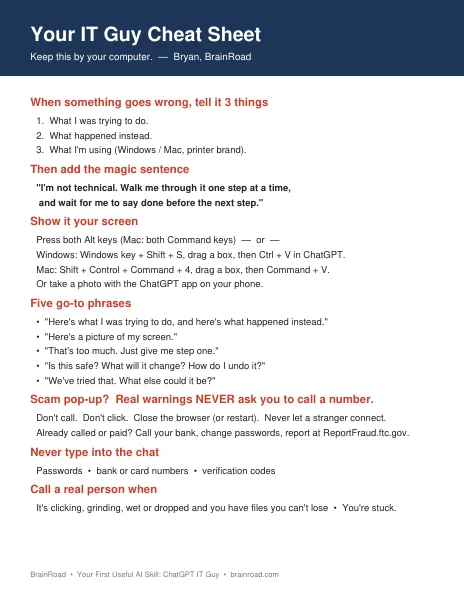
Not ready for the full course? Get the free cheat sheet.
The magic sentence, the three things to tell ChatGPT, how to show it your screen and the scam pop-up rule, on one printable page. I’ll email it to you, plus a few short tips over the next week.