Get back to what you sat down to do.
$99 per problem, fixed remotely

Bryan Leasure30 years in IT. I do the work.
Remote access only with your approval. You can disconnect.
Free diagnosis. Not fixed? You don’t pay.
Calls: 10:00 a.m.–9:00 p.m. Central, Monday–Saturday.
You needed to print one page. Send one email. Join one call. Instead, you’re reading instructions that don’t match your screen—and the thing you needed to do is still waiting.
I’m Bryan. With your permission, I can work on your computer while you watch and we talk. You explain what’s happening. I handle the troubleshooting. When it’s fixed, we try the original task together. Remote help is available anywhere in the U.S.
You can ask questions before you download anything.
One small problem can hold up your whole day.
You don’t have to know whether it’s a setting, a program or the computer itself. Start with the thing that stopped working. I’ll find out whether remote help fits before you commit to a repair.
Let me see what you’re seeing.
An online checklist leaves you hunting for a button that isn’t there. Explaining it over the phone means reading every message out loud. In a remote session, I can see the problem with your permission and fix it while we talk.
When I’m done, we test it together: open the email, print the page, join the meeting, whatever you were trying to do.
How a session works
- We talk first. You tell me what’s going on in plain English.
- If remote help fits, I send you a Zoom link. Open it on the computer that needs help. brainroad.com/connect shows each step.
- Join the meeting and approve my request. Now I can see your screen and fix it while we talk.
- If it needs a restart, I’ll ask first. When we’re done, you stop sharing and I can’t see your screen anymore.
You approve. You watch. You can disconnect.
- Can you get into my computer without me?
- No. You start the session and approve it. When we’re done, it’s over. Ongoing access would need a separate agreement with you.
- Can I stop it?
- Any time. Click Stop Share in Zoom, or leave the meeting, or just tell me to end it.
- Isn’t this what scammers do?
- You arrange the help with me. I may return your request or call at an agreed appointment, but I never make an unexpected call claiming your computer has a problem. Unsure who’s calling? Hang up and call the number published here.
- Can I set this up for my mom or dad?
- Yes. Give them my number, or call me together. They approve the connection on their own computer and can end it any time. You can join the Zoom call too, from wherever you are.
- What will I need to do?
- Stay near the computer, join the Zoom meeting and click Approve. You need the free Zoom app on that computer; if it isn’t there, I’ll walk you through getting it from zoom.us. You might need your computer’s password. Macs ask for a couple of extra permissions, and I’ll walk you through them.
- Does it matter what state I’m in?
- No. Remote help works anywhere in the U.S. I take calls 10:00 a.m.–9:00 p.m. Central, Monday–Saturday. Tell me your time zone and we’ll find a time.
- How long does it take?
- I reserve an hour so we have time to connect and work through the problem. Most remote fixes take 15–30 minutes. If it needs longer, I’ll tell you before we keep going.
- What does it cost?
- $99 flat per problem. The diagnosis is free, and if I can’t fix it, you don’t pay.
Will remote help work for you?
- The computer works, but something on it doesn’t.
- Email, printers, Wi-Fi, slowness, pop-ups, settings and programs are usually perfect for remote help.
- It won’t turn on or get online.
- I can’t connect to a computer that’s off. Call me anyway. We’ll figure out the next step, and if you’re near Columbia, Missouri, you can drop it off.
- You’re nervous about the download.
- Good instinct. Call first and ask me anything. Nothing gets installed just to talk.
The $99 price covers one problem. Setting up a whole new computer and business IT work are priced separately. Already on the phone with me? Go to the connect page.
Want someone to call for the next question, too? Home Tech Care is $299/yr: call as often as you need, a yearly check-up, 20% off repairs, and my ChatGPT IT Guy course and setup included. The ChatGPT subscription is separate.
Free · 10 minutes
You can use ChatGPT and still have someone to call.
You’ve asked it for help. It’s worked through a few things, and now you’d like a person to look at the next step with you. That doesn’t mean you’ve done anything wrong. Learning a useful skill doesn’t mean you have to handle everything alone. Tell me what you’re trying to do and where you got stuck. We’ll talk it through. The check is free, about ten minutes.
- “Can you help me understand what it’s suggesting?”
- “It tried something, but the printer still won’t print.”
- “I’d rather have you handle this one.”
If it turns out to need a fix, a remote fix is $99 flat, and if I can’t fix it, you don’t pay.
Want ChatGPT to do the clicking instead of handing you instructions? I’ll show you the setup in ChatGPT IT Guy. Learn it yourself, ask me to set it up, or call when you want personal help. You choose.
You’ve spent enough time guessing. Let’s look at it.
Sit by the computer and tell me what you were trying to do. The diagnosis is free. A suitable home remote fix is $99 per problem, agreed before I start. If I can’t fix it, you don’t pay.
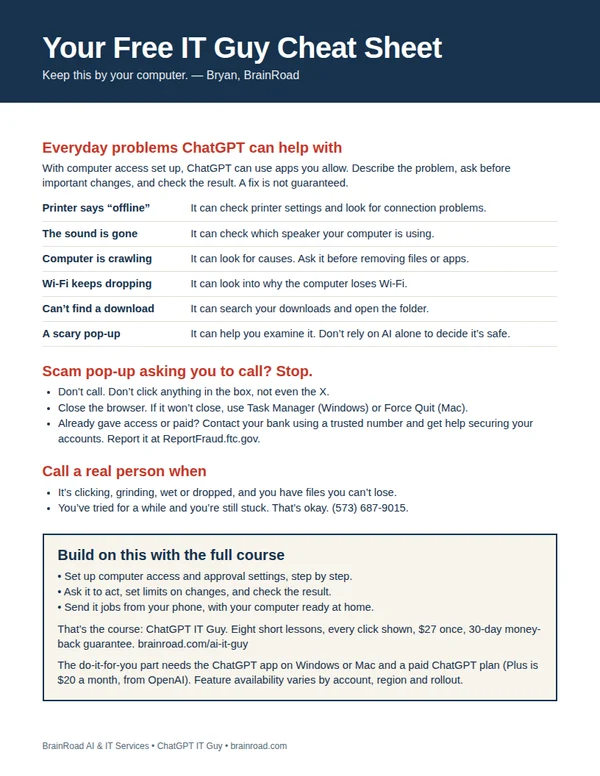
Not ready to call? Get my free cheat sheet.
The next time the computer acts up, have somewhere to start. My one-page cheat sheet gives you ideas for what to ask ChatGPT, the scam pop-up rule, and when to bring me in. I’ll email it to you, plus a few short tips over the next week.
For the everyday computer jobs you’d like handled.
A setting you can’t find. A folder that needs sorting. Once your computer is working and online, ChatGPT can do the clicking in the apps you allow. I’ll show you the setup, what to ask and how to stay in charge. You can even send jobs from your phone while your computer stays awake and connected.
Show me how · $27 Want me to set it up for you?
The course is one payment. A paid ChatGPT plan is separate. Personal setup is a separate service, quoted first.