Before you buy a new computer…
Free 10-minute second opinion

Bryan Leasure30 years in IT. I do the work.
Remote access only with your approval. You can disconnect.
Keep it, upgrade it or replace it. Let’s talk first.
Calls: 10:00 a.m.–9:00 p.m. Central, Monday–Saturday.
You’ve restarted it. Closed everything. You’re still waiting for one email to open. Is the computer worn out—or is something simply getting in its way?
Let’s look at the one you have. Tell me what you use it for and where it gets stuck. I’ll help you decide whether to fix it, upgrade it, or replace it. The second opinion is free.
If a home remote fix makes sense, it’s $99 flat. If I can’t fix it, you don’t pay.
If replacement makes sense, you can buy anywhere. Hardware I supply is at cost, with the receipt.
What do you need?
“It’s slow” doesn’t tell you what to buy.
More memory, a new drive or a whole new computer might help. But buying before checking skips the real question: what’s actually stopping this one from doing what you need?
Tell me what you use it for, where it gets stuck and what you want to spend. You’ll get one of three answers. Sometimes I need to take a closer look first, and that’s free too.
- Keep it
- What’s still good, what needs attention, and whether a repair makes sense for how you use it. If a $99 tune-up is all it needs, I’ll tell you.
- Upgrade it
- What would actually help, usually memory or a faster drive, what it costs all in, and the most it’s worth spending on a computer that age.
- Replace it
- Two or three specific computers that fit your budget and what you do, plus what to ignore at the store. Buy it wherever you like. I never mark up hardware.
Spend money on what will actually help.
I never mark up hardware. If you do need a new computer, I’ll show you two or three specific options and can order one at cost, with the receipt, or you buy it anywhere you like. Choosing, ordering, full setup and moving your files are $199 flat.
Age alone doesn’t decide it. What failed, what the repair costs and what you use the computer for all matter.
Then it’s your call
- Do nothing. The advice is yours to keep.
- Let me look closer. The diagnosis is free.
- Keep it. A remote fix is $99; hands-on repair is $149 labor, parts at cost.
- Replace it. I’ll help you choose, set it up and move your agreed files and compatible programs for $199. Hardware and licenses are separate; recovery from a failing drive is quoted separately.
You don’t need to shop before you call.
- What should I have ready?
- Just tell me what you do on the computer and what’s become a pain. If you know roughly how old it is, great. No specs needed.
- Can you decide in ten minutes?
- Often, yes. If it’s crashing for no clear reason or something may be failing, I’ll want to look closer before telling you to spend money. That’s free too.
- It still runs Windows 10. Do I need a new computer?
- Not always. Standard Windows 10 support ended on October 14, 2025. An eligible computer may be able to upgrade to Windows 11 without buying a new Windows license. Microsoft also offers Extended Security Updates (ESU) for eligible Windows 10 computers. Its consumer program currently provides critical and important security updates through October 12, 2027, with enrollment required; business use has separate requirements. I’ll check your computer and explain the upgrade, temporary ESU and replacement options before you spend money. See Microsoft’s current consumer ESU details.
- What about everything on the old computer?
- If you replace it, I’ll move your files, programs, email and printer too. Complete setup and transfer are $199, and nothing on the old one gets erased until it’s all checked.
Free · 10 minutes
You can use ChatGPT and still have someone to call.
You’ve asked it for help. It’s worked through a few things, and now you’d like a person to look at the next step with you. That doesn’t mean you’ve done anything wrong. Learning a useful skill doesn’t mean you have to handle everything alone. Tell me what you’re trying to do and where you got stuck. We’ll talk it through. The check is free, about ten minutes.
If it turns out to need a fix, a remote fix is $99 flat, and if I can’t fix it, you don’t pay.
Want ChatGPT to do the clicking instead of handing you instructions? I’ll show you the setup in ChatGPT IT Guy. Learn it yourself, ask me to set it up, or call when you want personal help. You choose.
Before you spend hundreds, find out what would help.
The second opinion is free. Tell me what it’s doing, what you need it to do and what you want to spend. I’ll tell you whether to fix it, upgrade it or replace it. Then you decide.
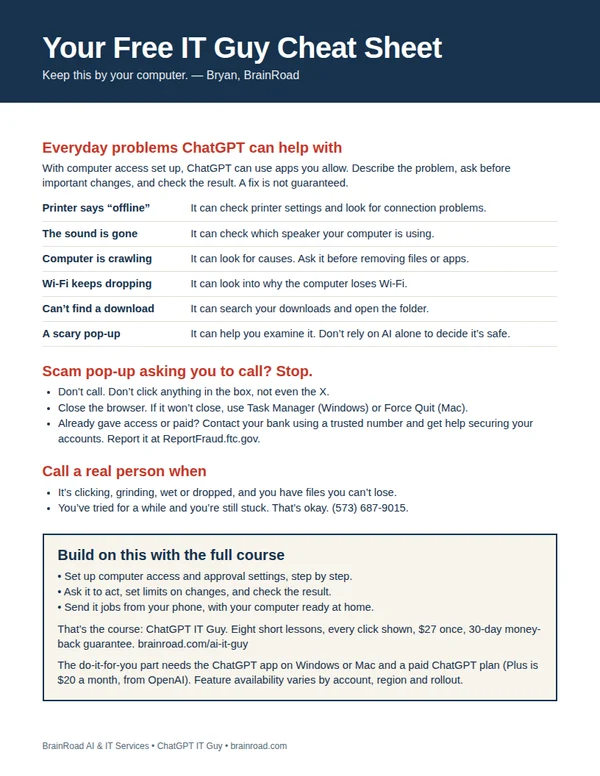
Not ready to call? Get my free cheat sheet.
The next time the computer acts up, have somewhere to start. My one-page cheat sheet gives you ideas for what to ask ChatGPT, the scam pop-up rule, and when to bring me in. I’ll email it to you, plus a few short tips over the next week.
For the everyday computer jobs you’d like handled.
A setting you can’t find. A folder that needs sorting. Once your computer is working and online, ChatGPT can do the clicking in the apps you allow. I’ll show you the setup, what to ask and how to stay in charge. You can even send jobs from your phone while your computer stays awake and connected.
Show me how · $27 Want me to set it up for you?
The course is one payment. A paid ChatGPT plan is separate. Personal setup is a separate service, quoted first.