What I help with
- Slow startup and shutdown
- Freezing and “Not responding”
- Stuck or endless updates
- Junk and unwanted software
- Full drives
$99 per problem, fixed remotely

Bryan Leasure30 years in IT. I do the work.
Remote access only with your approval. You can disconnect.
Free diagnosis. Not fixed? You don’t pay.
Calls: 10:00 a.m.–9:00 p.m. Central, Monday–Saturday.
You click. You wait. You click again. Ten minutes to open one email. You’ve started planning your morning around how long the computer takes to wake up.
Slow doesn’t tell you whether you need a cleanup, a repair or a new computer. I find what’s holding yours up, explain what would help and test it against the everyday tasks you actually use it for. Start with a free diagnosis.
Free diagnosis. $99 flat remote tune-up. Not better? You don’t pay.
Anywhere in the U.S. You watch every click, and you can disconnect any time.
You don’t need the technical words. Tell me which of these sounds like your computer, or just describe what it’s doing.
I don’t just run a cleaner and hope. I find what’s actually slowing it down, fix that, and tell you the truth about the hardware.
Programs that start with the computer, stuck updates, a full drive, junk software, or something that shouldn’t be there at all.
I remove what shouldn’t be running, finish the updates, and free up room, while you watch.
If the drive is failing or it simply needs more memory, I’ll tell you, and what it would cost.
If it really isn’t worth fixing, I’ll say so before you spend money, and help you pick a replacement at cost.
Before you replace a computer you know your way around, find out what’s making it slow. You’ll get a recommendation based on its condition and what you need it to do.
Thinking about replacing it? Get a free second opinion firstTell me what it’s doing and what you use it for. The diagnosis is free, a remote tune-up is $99 flat, and if it isn’t better, you don’t pay.
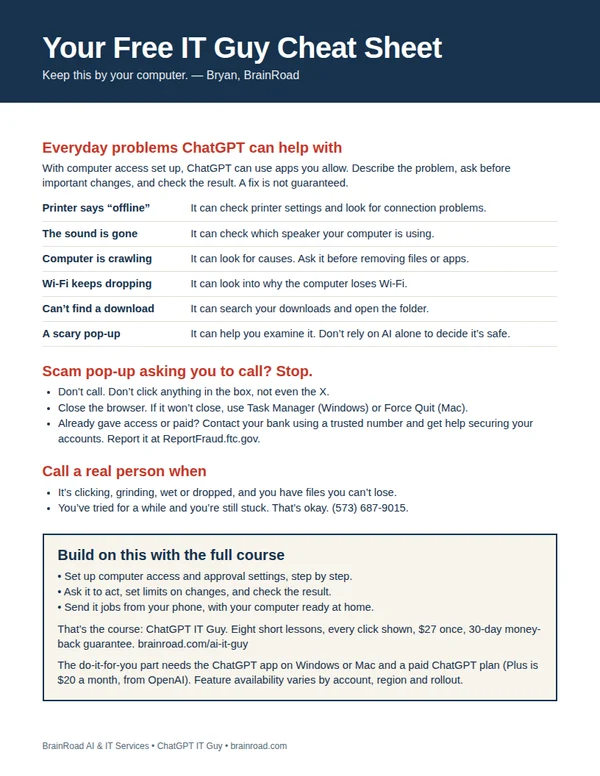
The next time the computer acts up, have somewhere to start. My one-page cheat sheet gives you ideas for what to ask ChatGPT, the scam pop-up rule, and when to bring me in. I’ll email it to you, plus a few short tips over the next week.
A setting you can’t find. A folder that needs sorting. Once your computer is working and online, ChatGPT can do the clicking in the apps you allow. I’ll show you the setup, what to ask and how to stay in charge. You can even send jobs from your phone while your computer stays awake and connected.
Show me how · $27 Want me to set it up for you?
The course is one payment. A paid ChatGPT plan is separate. Personal setup is a separate service, quoted first.