What I help with
- Malware and unwanted programs
- Browser hijackers and forced extensions
- Fake warnings and notification pop-ups
- Remote-access programs a scammer left behind
- Locking down accounts after a scam
$99 per problem, fixed remotely

Bryan Leasure30 years in IT. I do the work.
Remote access only with your approval. You can disconnect.
Free diagnosis. Not fixed? You don’t pay.
Calls: 10:00 a.m.–9:00 p.m. Central, Monday–Saturday.
Your heart sinks a little every time you open the laptop. Another warning. Another flashing box. You don’t know what’s real anymore, and you’re afraid to click anything.
You don’t have to sort out which warnings to believe by yourself. Tell me what appeared, what you clicked and whether anyone connected. I’ll check what changed, explain the cleanup and help you identify accounts that need attention. You can tell me the whole story without getting a lecture.
Free diagnosis. $99 flat remote cleanup. Not fixed? You don’t pay.
Anywhere in the U.S. You start the session, you watch every click, and you can end it any time.
You don’t need the technical words. Tell me which of these sounds like your computer, or just describe what it’s doing.
We need to understand what happened, remove unwanted software and work through the accounts that may need attention. I explain what I find and what you need to do next.
A lot of “virus warnings” are just website notifications and scare tactics. I tell those apart from an actual infection before anything gets bigger.
Malware, browser hijackers, sketchy extensions and leftover remote-access programs come off the computer.
We go over what happened and which accounts, passwords or payments need attention next.
Updates, browser settings and security checked before we hang up, and a plain list of anything you still need to do.
The free diagnosis tells us what kind of help you need before you spend anything. If it needs someone other than me, I’ll say so.
Not sure if the warning is real? The scam check is freeCall and tell me what appeared, what you clicked and whether anyone connected. The scam check is free, a remote cleanup is $99, and if I can’t fix it, you don’t pay.
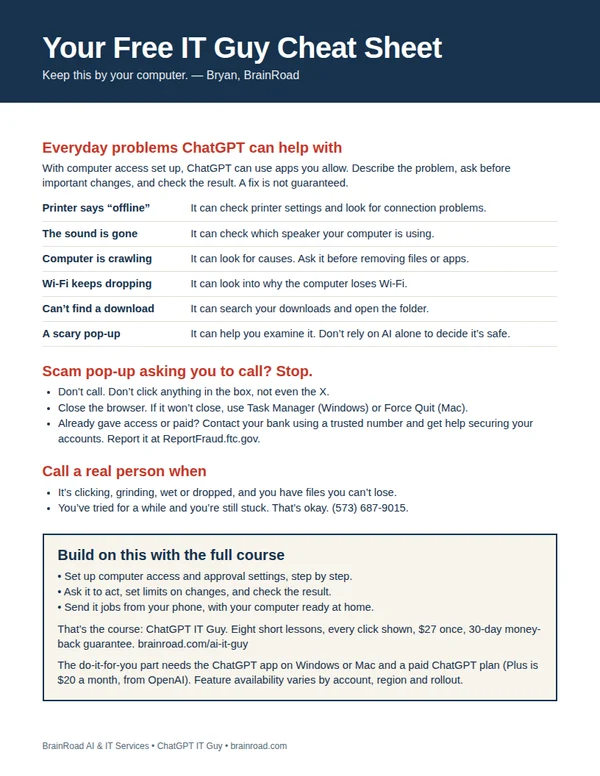
The next time the computer acts up, have somewhere to start. My one-page cheat sheet gives you ideas for what to ask ChatGPT, the scam pop-up rule, and when to bring me in. I’ll email it to you, plus a few short tips over the next week.