What I help with
- “Connected, no internet”
- One computer that won’t connect
- New router and password changes
- Network and driver problems
- Weak signal and dead zones
$99 per problem, fixed remotely

Bryan Leasure30 years in IT. I do the work.
Remote access only with your approval. You can disconnect.
Free diagnosis. Not fixed? You don’t pay.
Calls: 10:00 a.m.–9:00 p.m. Central, Monday–Saturday.
Full bars. Nothing loads. You were in the middle of something, and now you’re unplugging the router for the third time and waiting for the lights to come back.
A working phone beside a disconnected laptop is a clue. So is a room where every call drops. Tell me what still works and where the trouble starts. I’ll trace the connection, repair what I can reach and explain when the next step belongs with your internet provider.
Free diagnosis. $99 flat remote fix. Not fixed? You don’t pay.
Anywhere in the U.S. You watch every click, and you can disconnect any time.
You don’t need the technical words. Tell me which of these sounds like your computer, or just describe what it’s doing.
You shouldn’t have to keep restarting everything and hoping. I compare working devices and locations with the ones having trouble, then test changes against that pattern.
I compare the computer that fails with the devices that work. That tells us fast whether it’s the computer, the router, the signal or an outage.
Network settings, saved connections, drivers, VPN and security software, one change at a time so we know what fixed it.
After a new router, I reconnect the computers and the printer to the right network and test them.
If a dead zone or old router is the real cause, I explain the options. Buy anywhere you like. I never mark up hardware.
The free diagnosis tells us what kind of help you need before you spend anything. If it needs someone other than me, I’ll say so.
New router knocked the printer offline too? See printer helpCall with the problem computer and one working device nearby. The diagnosis is free, a remote fix is $99, and if I can’t fix it, you don’t pay.
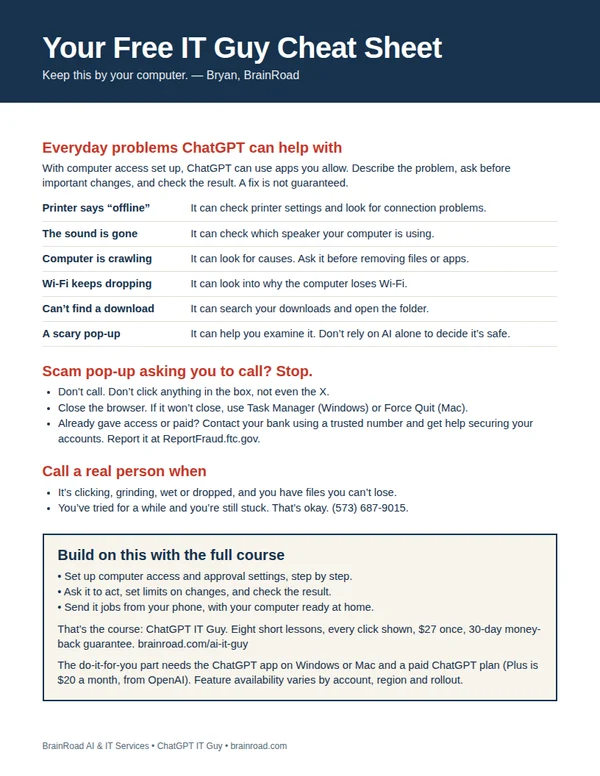
The next time the computer acts up, have somewhere to start. My one-page cheat sheet gives you ideas for what to ask ChatGPT, the scam pop-up rule, and when to bring me in. I’ll email it to you, plus a few short tips over the next week.
A setting you can’t find. A folder that needs sorting. Once your computer is working and online, ChatGPT can do the clicking in the apps you allow. I’ll show you the setup, what to ask and how to stay in charge. You can even send jobs from your phone while your computer stays awake and connected.
Show me how · $27 Want me to set it up for you?
The course is one payment. A paid ChatGPT plan is separate. Personal setup is a separate service, quoted first.